# Vite Setup with Playwright - Part 6
> Add Playwright end-to-end tests to a Vite React app and organize them with a page object class. Part 6 of the Vite setup series.
Source: https://igorprvieira.com/blog/2023-04-03-vite-setup-playwright/
Author: Igor Vieira
Published: 2023-04-03
This part adds Playwright to a Vite React TypeScript project with a baseURL and webServer on port 3000 and a test that clicks a counter. The selectors and steps then move into a CounterPage page object.
Playwright
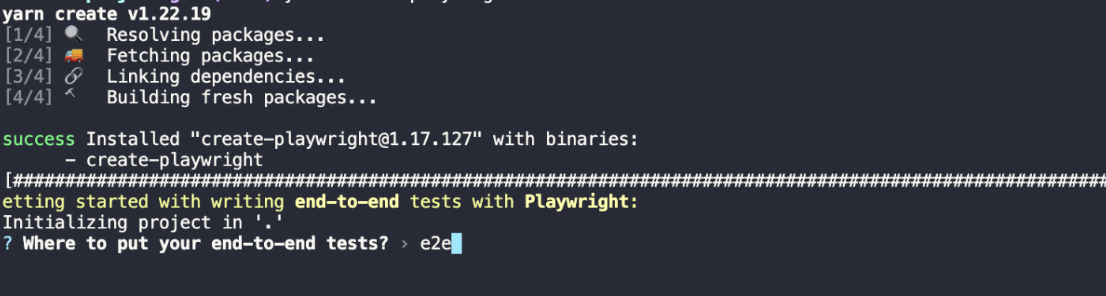
With playwright we start with its yarn create:
```bash
yarn create playwright
```
 Workflow como false:
 And it should install playwright in the dev dependencies and should also save the plugins for eslint there
And I changed some things in our package.json script, adding e2e tests and splitting the build form in two:
```json
{
//other scripts above
"test:playwright": "playwright test --headed --config=playwright.config.ts --project=chromium",
"test:playwright:helper": "npx playwright codegen http://localhost:3000"
//other scripts below
}
```
And in playwright I only defined the ports where it should run:
```json
baseURL: "http://localhost:3000",
```
```json
{
webServer: {
command: "npm run start",
port: 3000,
timeout: 120 * 1000,
reuseExistingServer: !process.env.CI,
}
}
```
I also deleted the test-examples folder and in the e2e folder I created this file `counter.spec.ts`:
```shell
└── e2e
└── counter.spec.ts
```
And our counter should look like this:
```typescript
import { test, expect } from "@playwright/test";
test("get started link", async ({ page }) => {
await page.goto("http://localhost:3000/");
await expect(page.getByTestId("counter-view")).toBeVisible();
await expect(page.getByTestId("counter-view")).toHaveText("0");
await page.getByRole("button", { name: /increment/i }).click();
await expect(page.getByTestId("counter-view")).toHaveText("1");
});
```
And it should install playwright in the dev dependencies and should also save the plugins for eslint there
And I changed some things in our package.json script, adding e2e tests and splitting the build form in two:
```json
{
//other scripts above
"test:playwright": "playwright test --headed --config=playwright.config.ts --project=chromium",
"test:playwright:helper": "npx playwright codegen http://localhost:3000"
//other scripts below
}
```
And in playwright I only defined the ports where it should run:
```json
baseURL: "http://localhost:3000",
```
```json
{
webServer: {
command: "npm run start",
port: 3000,
timeout: 120 * 1000,
reuseExistingServer: !process.env.CI,
}
}
```
I also deleted the test-examples folder and in the e2e folder I created this file `counter.spec.ts`:
```shell
└── e2e
└── counter.spec.ts
```
And our counter should look like this:
```typescript
import { test, expect } from "@playwright/test";
test("get started link", async ({ page }) => {
await page.goto("http://localhost:3000/");
await expect(page.getByTestId("counter-view")).toBeVisible();
await expect(page.getByTestId("counter-view")).toHaveText("0");
await page.getByRole("button", { name: /increment/i }).click();
await expect(page.getByTestId("counter-view")).toHaveText("1");
});
```
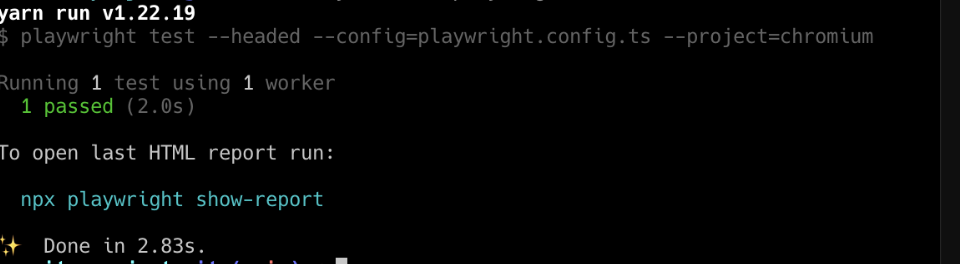 Well, at this point everything should run well, however I just want to leave it a bit more organized
so you can run it in a production environment in a real CI/CD and let's create
the following folders:
```shell
└── e2e
└── components
└── counter.ts
└── tests
└── counter.spec.ts
└── tsconfig.json
└── vite.config.ts
```
The first file is to manage our folders and make them be read, which is tsconfig.json:
```json
{
"compilerOptions": {
"noUnusedLocals": true,
"strict": true,
"strictNullChecks": true,
"baseUrl": ".",
"module": "esnext",
"moduleResolution": "node",
"paths": {
"components/*": ["./components/*"],
"tests/*": ["./tests/*"]
},
"resolveJsonModule": true,
"noEmit": true,
"allowJs": true,
"esModuleInterop": true,
"forceConsistentCasingInFileNames": true,
"jsx": "preserve",
"lib": ["ESNext", "DOM"],
"target": "esnext",
"skipLibCheck": true
},
"exclude": ["node_modules"]
}
```
The second is just an instance of playwright to run our application properly:
```typescript
import type { PlaywrightTestConfig } from "@playwright/test";
export default {
use: {
baseURL: "http://localhost:8080",
},
} as PlaywrightTestConfig;
```
And now we'll just organize our counter to be able to handle the various test paths and counter.spec to run our tests, and for this we'll pass the data through our constructor and always instantiating in our tests:
counter.ts:
```typescript
import { expect, BrowserContext, Page, Locator } from "@playwright/test";
export class CounterPage {
readonly page: Page;
readonly context: BrowserContext;
readonly counterView: Locator;
readonly incrementButton: Locator;
constructor(page: Page) {
this.page = page;
this.context = page.context();
this.counterView = page.locator('[data-testid="counter-view"]');
this.incrementButton = page.getByRole("button", { name: "Increment" });
}
async goto() {
await this.page.goto("http://localhost:3000/");
}
async happyPath() {
await expect(this.counterView).toBeVisible();
await expect(this.counterView).toHaveText("0");
await this.incrementButton.click();
await expect(this.counterView).toHaveText("1");
}
}
```
counter.spec.ts:
```typescript
import { test } from "@playwright/test";
import { CounterPage } from "components/counter";
test("get started link", async ({ page }) => {
const counterComponent = new CounterPage(page);
await counterComponent.goto();
await counterComponent.happyPath();
});
```
And well, we're done with our setup here, I hope you enjoyed it and here's the repository link:
Github: [Vite Setup](https://github.com/igorvieira/vite-setup)
Well, at this point everything should run well, however I just want to leave it a bit more organized
so you can run it in a production environment in a real CI/CD and let's create
the following folders:
```shell
└── e2e
└── components
└── counter.ts
└── tests
└── counter.spec.ts
└── tsconfig.json
└── vite.config.ts
```
The first file is to manage our folders and make them be read, which is tsconfig.json:
```json
{
"compilerOptions": {
"noUnusedLocals": true,
"strict": true,
"strictNullChecks": true,
"baseUrl": ".",
"module": "esnext",
"moduleResolution": "node",
"paths": {
"components/*": ["./components/*"],
"tests/*": ["./tests/*"]
},
"resolveJsonModule": true,
"noEmit": true,
"allowJs": true,
"esModuleInterop": true,
"forceConsistentCasingInFileNames": true,
"jsx": "preserve",
"lib": ["ESNext", "DOM"],
"target": "esnext",
"skipLibCheck": true
},
"exclude": ["node_modules"]
}
```
The second is just an instance of playwright to run our application properly:
```typescript
import type { PlaywrightTestConfig } from "@playwright/test";
export default {
use: {
baseURL: "http://localhost:8080",
},
} as PlaywrightTestConfig;
```
And now we'll just organize our counter to be able to handle the various test paths and counter.spec to run our tests, and for this we'll pass the data through our constructor and always instantiating in our tests:
counter.ts:
```typescript
import { expect, BrowserContext, Page, Locator } from "@playwright/test";
export class CounterPage {
readonly page: Page;
readonly context: BrowserContext;
readonly counterView: Locator;
readonly incrementButton: Locator;
constructor(page: Page) {
this.page = page;
this.context = page.context();
this.counterView = page.locator('[data-testid="counter-view"]');
this.incrementButton = page.getByRole("button", { name: "Increment" });
}
async goto() {
await this.page.goto("http://localhost:3000/");
}
async happyPath() {
await expect(this.counterView).toBeVisible();
await expect(this.counterView).toHaveText("0");
await this.incrementButton.click();
await expect(this.counterView).toHaveText("1");
}
}
```
counter.spec.ts:
```typescript
import { test } from "@playwright/test";
import { CounterPage } from "components/counter";
test("get started link", async ({ page }) => {
const counterComponent = new CounterPage(page);
await counterComponent.goto();
await counterComponent.happyPath();
});
```
And well, we're done with our setup here, I hope you enjoyed it and here's the repository link:
Github: [Vite Setup](https://github.com/igorvieira/vite-setup)